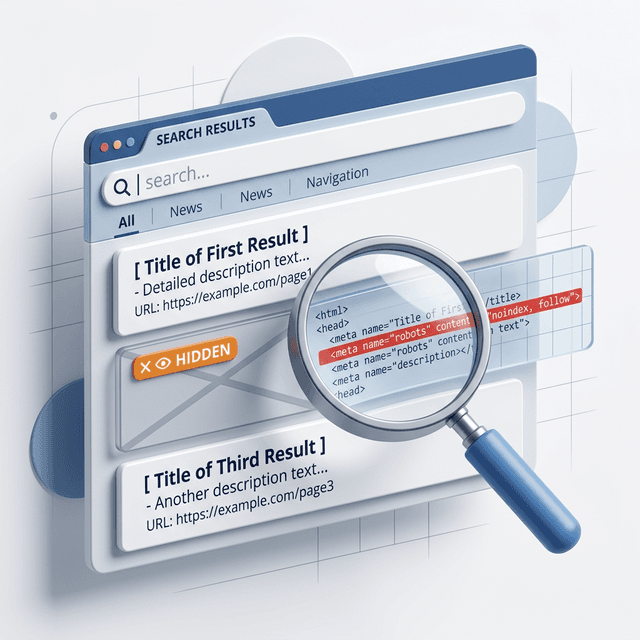

If a page is marked noindex, it does not matter how good the content is. Google can crawl it, but it should not keep that page in search results. That is useful when you want to hide thin, duplicate, or private pages. It is a problem when the wrong URL gets tagged by mistake.
That is why a noindex checker matters. It helps you confirm whether an important page is being blocked by a robots meta tag or X-Robots-Tag header before you waste time rewriting content that cannot rank anyway.
In this guide
- What a noindex checker should actually verify
- How to confirm a real indexing block in Search Console
- Common noindex mistakes after redesigns and CMS changes
- How to fix blocked money pages safely
What a Noindex Checker Does
A noindex checker tests whether a page is sending a noindex instruction through:
- a
<meta name="robots" content="noindex">tag - a crawler-specific tag such as
googlebot - an
X-Robots-TagHTTP response header
A strong checker also helps you verify related signals that often get confused with noindex:
robots.txtblocks- canonicals pointing elsewhere
- redirects
- status code errors
That distinction matters. robots.txt controls crawling. noindex controls indexing. Google’s documentation is clear that if a page is blocked in robots.txt, Google may never see the noindex directive on the page at all.
When You Should Check for Noindex Problems
Run a noindex check any time:
- a page disappears from Google unexpectedly
- traffic drops after a migration or template rollout
- product, blog, or location pages are not getting indexed
- staging settings may have leaked into production
- a plugin or CMS SEO setting was changed
This is especially important after technical updates. Many indexing losses are not content failures at all. They are release mistakes.
If rankings dropped and you are not sure whether the issue is technical or content-related, pair this with your lost keyword ranking recovery workflow.
How to Check if a Page Has a Noindex Tag
Free Tool
Check if a URL is noindexed
Enter one public URL. This checks the live page for meta robots and X-Robots-Tag noindex directives.
1. Inspect the Page Source
View the HTML source and search for:
noindexrobotsgooglebot
Look inside the <head> section for a meta robots tag.
2. Check the HTTP Headers
Some pages do not use an HTML meta tag at all. Instead they return an X-Robots-Tag header. This is common for PDFs, files, or server-level rules.
Check whether the response includes:
X-Robots-Tag: noindexX-Robots-Tag: noindex, nofollow
3. Use Google Search Console URL Inspection
URL Inspection is the fastest way to confirm what Google sees.
Check:
- whether the page is indexed
- whether Google can crawl it
- whether Google detected a
noindexrule - whether the tested live URL matches the page you expect
If Search Console says the page is excluded because of noindex, trust that over a generic site operator check.
For a broader diagnostic process, use the same routine from how to do an SEO audit.
The Most Common Noindex Mistakes
Staging Rules Left on Production
This is the classic failure. A developer noindexes staging or prelaunch templates, then the rule ships live.
Watch for:
- global template tags
- CMS sitewide search visibility settings
- server rules copied from staging
Plugins or Themes Changing Page Settings
SEO plugins, ecommerce apps, and template settings can apply noindex to:
- tag pages
- filtered collections
- paginated URLs
- attachment pages
- custom post types
Server-Level Header Rules
A server can send X-Robots-Tag headers to entire file types or directories. That is useful for documents and low-value resources, but dangerous when applied too broadly.
Confusing Noindex with Canonicalization
Teams sometimes use noindex where a canonical would be the cleaner fix. Google recommends canonicalization for duplicate versions within a site rather than using noindex as the main consolidation method.
If duplicate URLs are the real issue, review your canonical tag guide and canonical checker workflow.
What to Do If an Important Page Is Noindexed
Use this order:
- Confirm whether the noindex is intentional.
- Remove the tag or header only if the page should rank.
- Make sure the page is not blocked in
robots.txt. - Verify the canonical points to the correct URL.
- Request reinspection in Search Console.
- Monitor the Page Indexing report and Performance report.
Do not remove noindex blindly from every page. Some URLs should stay out of Google, including:
- login and account areas
- internal search results
- thank-you pages
- duplicate filter combinations
- thin utility pages
The goal is not maximum index count. The goal is index quality.
A Practical Noindex Audit Checklist
- [ ] Check a sample of key landing pages for meta robots rules
- [ ] Check server headers for
X-Robots-Tag - [ ] Inspect declining URLs in Search Console
- [ ] Review newly published pages that have zero impressions
- [ ] Verify staging or preview environments are not accessible to Google
- [ ] Review templates for accidental global noindex logic
If you are auditing many URLs at once, combine this with a crawl and compare results against your XML sitemap and published page inventory.
Ready to Automate Your SEO?
AgenticSEO helps you catch indexing risks, spot hidden blockers, and turn Search Console issues into prioritized technical fixes before they cost you traffic.
Start your free AgenticSEO analysis and indexing workflow
Frequently Asked Questions
What is the difference between noindex and robots.txt?
robots.txt controls whether crawlers can access a URL. noindex tells search engines not to keep a page in search results. If a page is blocked in robots.txt, Google may not be able to see the noindex instruction on that page.
Can a page still appear in Google if it has noindex?
It should be removed after Google crawls and processes the directive, but that can take time. If the page is still showing, check whether Google has recrawled it and whether the noindex rule is actually visible to Googlebot.
Should I noindex duplicate pages instead of using canonical tags?
Usually no. For duplicate or near-duplicate URLs on the same site, canonicalization is often the cleaner solution. Use noindex when you truly do not want the page in search results at all.
Key Takeaways
- A noindex checker should verify both HTML meta tags and HTTP headers.
- Search Console URL Inspection is the best way to confirm whether Google sees a noindex rule.
- Many noindex problems come from template rollouts, plugins, or staging settings, not content quality.
- Fix the right signal first: noindex, robots.txt, canonical, redirect, or status code.