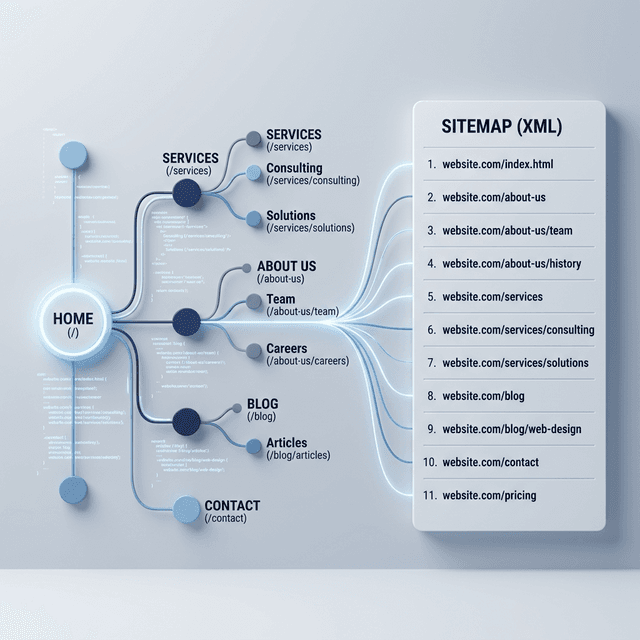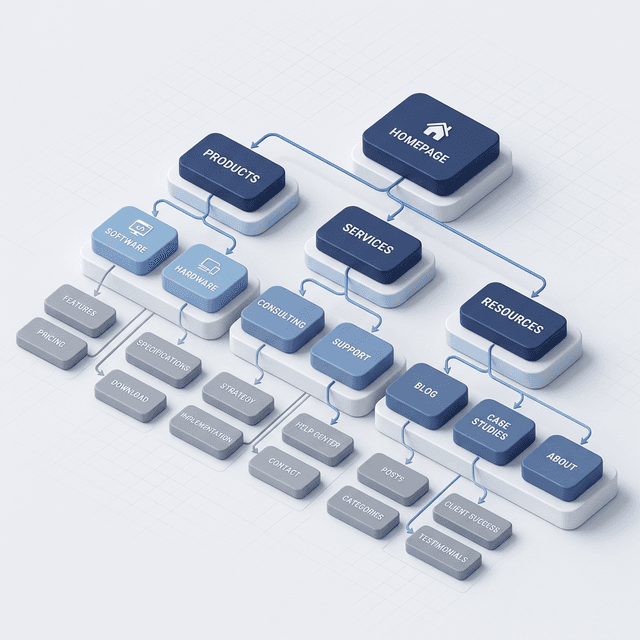

Website taxonomy sounds academic, but it affects practical SEO every day. It shapes how your content is grouped, how your URLs are organized, how internal links flow, and how easy it is for users to find the next relevant page.
If your site feels messy, hard to scale, or full of overlapping pages, taxonomy is usually part of the problem. A clear taxonomy gives your site structure. A bad one creates clutter, orphan pages, and confusing content paths.
In this guide
- What website taxonomy actually means
- How taxonomy affects crawlability and internal links
- What a scalable content structure looks like
- How to fix messy categories and overlapping sections
What Website Taxonomy Means
Website taxonomy is the system you use to classify and organize pages across your site.
In practice, that usually includes:
- top-level sections
- categories and subcategories
- URL folder structure
- navigation labels
- parent-child page relationships
- internal linking paths
Search Engine Journal describes website taxonomy as the way pages are structured into silos through subfolders and page relationships. That is a useful starting point, but taxonomy is bigger than just URLs. It is the full classification system behind your site.
Why Website Taxonomy Matters for SEO
Taxonomy affects SEO because it influences how easily search engines and users can understand your site.
It Improves Crawl Paths
When pages are grouped cleanly, crawlers can move through your site more efficiently. Important pages are easier to discover and revisit.
It Strengthens Internal Linking
Clear section relationships make contextual linking easier. That helps related pages reinforce each other naturally.
It Reduces Content Overlap
A good taxonomy makes it easier to decide:
- which topic belongs in which section
- when a page deserves its own URL
- when content should be merged instead of split
That lowers the chance of keyword cannibalization and scattered authority.
It Makes Navigation Better for Users
People do not think in sitemaps. They think in tasks. A strong taxonomy helps them move from broad topic to specific answer without friction.
What a Good Website Taxonomy Looks Like
A solid taxonomy is:
- clear
- shallow enough to navigate easily
- specific enough to separate different intents
- consistent in naming
- scalable as new content is added
For example, a clean blog structure might group content by a few strategic sections such as:
- Technical SEO
- Content Strategy
- AI Visibility
- Automation
That is much easier to scale than dumping every article into one undifferentiated archive or creating dozens of tiny categories that never grow.
Signs Your Taxonomy Needs Work
Watch for these symptoms:
- blog posts live in random URL paths
- categories overlap heavily
- multiple pages answer nearly the same question
- navigation labels are vague
- orphan pages never receive internal links
- new content is hard to place
- categories exist with only one or two weak pages
A messy taxonomy often creates the same feeling for users and search engines: the site looks like it grew without a plan.
If your content library already feels scattered, pair this with a content cluster strategy and internal linking SEO guide.
Website Taxonomy vs Site Architecture
These ideas overlap, but they are not identical.
Taxonomy is the classification system. Site architecture is the broader structural implementation.
Taxonomy answers:
- what belongs together
- what the parent-child relationships are
- how sections should be labeled
Architecture answers:
- how pages are connected
- how deep the paths go
- how navigation and links expose those relationships
A bad taxonomy often leads to bad architecture, but the fix starts with classification first.
How to Plan a Better Taxonomy
1. Start with User Intent, Not Just Keywords
Do not build categories from raw keyword lists alone. Start with what users are trying to accomplish.
Examples:
- learn a concept
- compare options
- solve a technical problem
- evaluate a tool
- take an action
That usually creates better sections than volume-first planning.
2. Group Topics by Meaningful Buckets
Your top-level sections should reflect durable themes, not passing content ideas.
Good top-level buckets are:
- broad enough to support multiple pages
- distinct enough to avoid overlap
- recognizable to users immediately
3. Keep URLs Predictable
Your URL structure should reflect your taxonomy without becoming bloated.
Clear:
/blog/website-taxonomy/blog/internal-linking-seo-guide
Messy:
/2026/03/08/blog-post-about-site-structure/category/misc/seo/stuff/site-architecture-guide-final
4. Define Page Roles
Not every page should do the same job.
Common roles include:
- hub pages
- glossary pages
- deep guides
- comparisons
- case studies
- supporting tutorials
Once page roles are clear, internal linking decisions become easier.
A Simple Website Taxonomy Framework
Use this framework when organizing a content-heavy site:
Core section
The broad theme or business area.
Topic cluster
A focused subject within that section.
Supporting pages
Pages that answer sub-questions, comparisons, or implementation details.
Conversion path
The page or action the cluster should support, such as a signup page, product page, or service page.
That is one reason AgenticSEO content works best when it links from broad educational topics into operational pages like how to do an SEO audit, autonomous SEO workflow, and signup.
Common Taxonomy Mistakes
Too Many Categories
If every new idea becomes a new section, your taxonomy becomes decoration instead of structure.
Categories Based on Internal Team Language
Users should understand section labels instantly. Internal jargon often makes navigation worse.
Forcing Every Page into a Deep Hierarchy
More levels do not make a site smarter. They usually make it harder to navigate and maintain.
Letting URL Structure Drift Over Time
As teams publish quickly, categories and slugs often become inconsistent. That creates long-term cleanup work.
Ignoring Internal Links
A well-labeled taxonomy without supporting links is incomplete. Pages need structural and contextual connections.
How to Audit Your Current Taxonomy
- [ ] List all top-level sections
- [ ] Map every important page to one clear section
- [ ] Flag overlapping categories
- [ ] Identify orphan or weakly linked pages
- [ ] Check whether URL paths reflect real topic relationships
- [ ] Review navigation labels for clarity
- [ ] Merge, rename, or remove low-value sections
This is also a smart time to review SEO topics and keyword mapping so new content fits a deliberate structure instead of creating more sprawl.
Ready to Automate Your SEO?
AgenticSEO helps you spot topic overlap, improve internal linking, and turn scattered content into a structure that is easier to crawl, maintain, and grow.
Start your free AgenticSEO content structure analysis
Frequently Asked Questions
What is the difference between taxonomy and navigation?
Taxonomy is the classification system behind your content. Navigation is one way users interact with that structure. A site can have a reasonable menu but still have a weak taxonomy underneath it.
Does website taxonomy affect rankings directly?
Not as a standalone ranking factor, but it strongly affects crawlability, internal linking, topical clarity, and user experience. Those all influence search performance over time.
How many categories should a website have?
There is no fixed number. Use the fewest top-level sections needed to organize your content clearly and scale it cleanly. If categories overlap constantly, you probably have too many.
Key Takeaways
- Website taxonomy is the system that organizes your pages into meaningful groups.
- Strong taxonomy improves crawl paths, internal linking, and publishing consistency.
- Weak taxonomy creates overlap, orphan pages, and confusing navigation.
- Plan sections around user intent and scalable topic groupings, not random keyword lists.