
On-page SEO is the part of optimization that is entirely within your control, and it is the part most people rush through. The irony is hard to miss: teams spend weeks on keyword research and content creation, then spend five minutes on the on-page elements that determine whether Google understands and rewards that content.
A page can have the best content on the internet for its topic and still underperform if the on-page signals are wrong. The title might not match the primary query. The heading structure might confuse crawlers about the page's topic hierarchy. Internal links might be absent. The introduction might bury the value proposition below three paragraphs of throat-clearing.
None of these are difficult problems to fix. They are easy problems to overlook. This checklist exists so you stop overlooking them.
Before you write: structural decisions
On-page SEO starts before the first word is drafted. The structural decisions you make at the planning stage determine how effectively Google can parse, categorize, and rank the finished page.
Your URL should be clean, descriptive, and stable. Use your primary keyword in a natural, readable format. Keep it short enough that it displays fully in search results. Avoid dates in URLs unless the content is genuinely time-bound (event coverage, annual reports) because dated URLs create an artificial freshness ceiling. Once the page is published, the URL should never change. Redirects work but they lose marginal authority and create maintenance overhead.
Your target keyword should be defined before writing, not discovered after. Every page needs one primary keyword that represents the core intent the page serves. Secondary keywords and related terms will appear naturally in well-written content. Forcing them into the page after writing produces awkward phrasing that helps neither readers nor search engines.
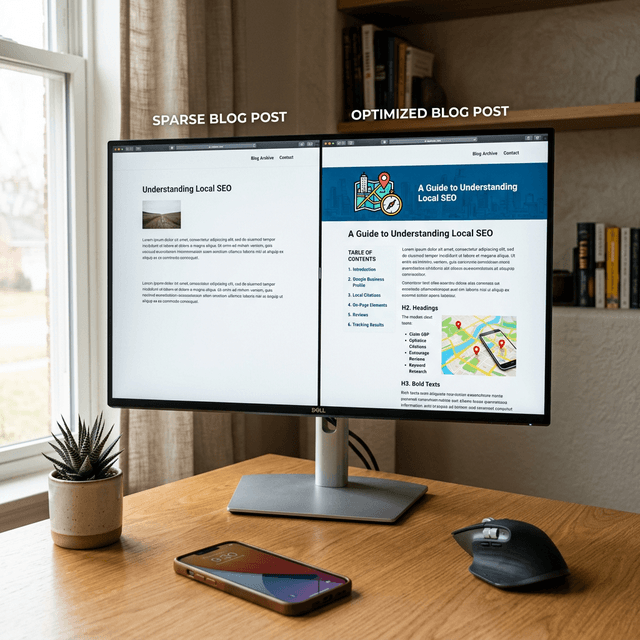
The heading structure should follow a logical hierarchy that mirrors how a reader would navigate the topic. Your H1 is the page title, used exactly once. H2s divide the page into major sections. H3s subdivide those sections where needed. This hierarchy is not decorative. It tells Google how the content is organized and which sections relate to which subtopics. A flat structure where every heading is an H2 misses the opportunity to communicate topical relationships.
The title tag: your most important 60 characters
More ranking potential is wasted on title tags than on any other single element. The title tag serves two functions simultaneously: it tells Google what the page is about, and it convinces searchers to click your result instead of the nine others on the page.
Your primary keyword should appear in the title, ideally near the beginning. This is not about keyword stuffing. It is about clarity. When a searcher looks at search results for "content optimization," a title that starts with "Content Optimization:" immediately signals relevance. A title that starts with "Everything You Need to Know About Making Your Website Better" buries the relevance signal.
Beyond the keyword, the title needs a hook that differentiates your result. Numbers, specificity, and implied value work consistently. "Content Optimization: The Step Between Publishing and Ranking" communicates a specific insight. "Content Optimization Guide" communicates nothing beyond the topic.
Keep titles under 60 characters to prevent truncation in search results. A truncated title loses its hook and looks unprofessional compared to competitors whose titles display completely.
The meta description: your sales pitch in 155 characters
Google does not use meta descriptions as a ranking factor, but they directly influence click-through rate, which indirectly affects rankings through user behavior signals.
A good meta description does three things in 155 characters or fewer: it confirms the page is relevant to the query, it communicates the specific value the reader will get, and it creates enough curiosity to generate a click.
Most meta descriptions fail because they are either auto-generated by the CMS (producing a random excerpt from the first paragraph) or written as dry summaries that match the title without adding new information. The meta description should complement the title, not repeat it. If the title says "On-Page SEO Checklist," the meta should explain what makes this checklist different or valuable, not just restate that it is a checklist.
Content depth: matching what the SERP demands
After the structural elements are set, the content itself needs to meet a depth threshold that matches what Google rewards for your target query.
Check the top 3 results for your primary keyword. Note their word count, the number of subtopics they cover, the depth of each section, and the types of evidence they include (data, examples, case studies, screenshots). Your content does not need to be longer than theirs, but it needs to be at least as comprehensive on the core subtopics and ideally deeper on the most important ones.
Thin sections are the most common content depth problem. A heading that promises to explain "how content optimization works" followed by two sentences and a bullet list does not satisfy the promise. Each section should deliver enough substance that a reader who only reads that section still gains useful knowledge. If a section cannot stand on its own, it either needs expansion or should be merged into an adjacent section.
Evidence and specificity separate content that ranks from content that exists. Statements like "SEO is important for businesses" add no value. Statements like "pages that rank in positions 1-3 receive 68% of all clicks for their query" add credible, useful information. Include specific numbers, named frameworks, real examples, and practical details throughout your content.
Internal linking: the element most pages neglect
Every page you publish should contain at least 3 contextual internal links to related pages on your site, and at least 2 existing pages should link to the new page. This bidirectional linking creates authority flow and helps Google discover and evaluate new content faster.
The anchor text for internal links should be descriptive and relevant to the target page's topic. "Click here" and "read more" waste the opportunity to reinforce topical signals. "See our guide to content decay detection" communicates the linked page's topic to both users and search engines.
Link placement matters. Links within the body content, surrounded by relevant context, carry more weight than links in sidebars, footers, or "related posts" widgets. A link that appears naturally within a paragraph about a related topic is the strongest type of internal link.
Before publishing, check that you are not linking to the same page multiple times with different anchor text (which dilutes the signal) and that every link target actually exists (broken internal links are a surprisingly common issue, especially on sites that frequently restructure content).
Images: the overlooked optimization layer
Images affect page load speed, user engagement, and search visibility through image search. Yet most pages publish images with default filenames, no alt text, and uncompressed file sizes.
Every image should have a descriptive filename that reflects its content. "IMG_4523.jpg" tells Google nothing. "on-page-seo-checklist-heading-structure.jpg" tells Google exactly what the image depicts.
Alt text should describe the image in a way that serves both accessibility and search purposes. Write alt text as if you are describing the image to someone who cannot see it. If the image naturally relates to your target keyword, the keyword will appear naturally in the description without being forced.
Compress images before uploading. Most images can be reduced by 60-80% without visible quality loss using tools like Squoosh or TinyPNG. An uncompressed hero image can add 2-3 seconds to page load time, which directly impacts both user experience and Core Web Vitals scores.
The pre-publish final check
Before hitting publish, run through these final items:
Does the introduction clearly state what the reader will learn or gain? If not, the bounce rate will be high because searchers will not see immediate relevance.
Is there one clear call to action? Every page should have a purpose beyond ranking. Whether it is a newsletter signup, a product trial, or a link to a conversion page, the CTA should be present and contextually relevant.
Are all links working? Click every internal and external link. Broken links at publication are inexcusable and create a poor first impression for both users and crawlers.
Is the page mobile-friendly? Preview the page on a mobile device or use Chrome's device emulation. Content that looks great on desktop but breaks on mobile loses more than half its potential audience.
Does the page load in under 3 seconds? Run a quick PageSpeed Insights check. If load time exceeds 3 seconds, investigate and fix the largest contributor before publishing.
For how this checklist fits into a broader content workflow, see Content Optimization: The Step Between Publishing and Ranking. For the complete strategy framework, see The Complete AI SEO Playbook.
Ready to Automate Your SEO?
AgenticSEO evaluates on-page SEO elements automatically and flags gaps before they cost you rankings.
Start your free AgenticSEO workflow
Related Articles
- Content Optimization: The Step Between Publishing and Ranking
- How to Do an SEO Audit (Without Getting Lost in 200 Tabs)
- Internal Linking for SEO: The Growth Lever Nobody Takes Seriously Enough
Frequently Asked Questions
What is the best first step to apply this guide?
Start with one high-potential page and one measurable hypothesis, then review results on a fixed weekly cadence.
How do I avoid over-optimizing too quickly?
Change one variable at a time where possible and track outcomes before making another major revision.
Key Takeaways
- Focus on intent alignment before adding volume.
- Prioritize updates using impact and effort, not intuition alone.
- Track outcomes in defined review windows so decisions improve over time.
- Reinforce results with internal links and clear topical structure.