
Most content calendars fail for one boring reason: they become a place where ideas are stored, not a place where decisions get made.
That is why a good Google Sheets content calendar template should do more than hold dates. It should help your team decide what to publish, who owns it, what stage it is in, and how it connects to SEO priorities.
What This Template Is Actually For
This template is designed for small teams, agencies, and lean marketing operations that want a lightweight planning system without buying another tool too early.
Google Sheets is not fancy, but it is flexible, easy to share, and fast to maintain. That makes it ideal when your process still needs to stay visible to humans.
The goal is not to create a beautiful spreadsheet. The goal is to make publishing more consistent.
What to Track in a Real Content Calendar
Many templates stop at title, author, and publish date. That is too thin for SEO-driven publishing.
Your calendar should also include:
- primary keyword
- search intent
- content type
- owner
- status
- publish date
- internal links to add
- refresh date or review window
If you skip those fields, the calendar becomes a list. Not a workflow.
Best for
Small teams that need one visible planning source without complex software overhead
Main mistake
Tracking dates without tracking intent, ownership, and status
Decision cue
If the sheet does not help you publish faster, it is too complicated or too shallow
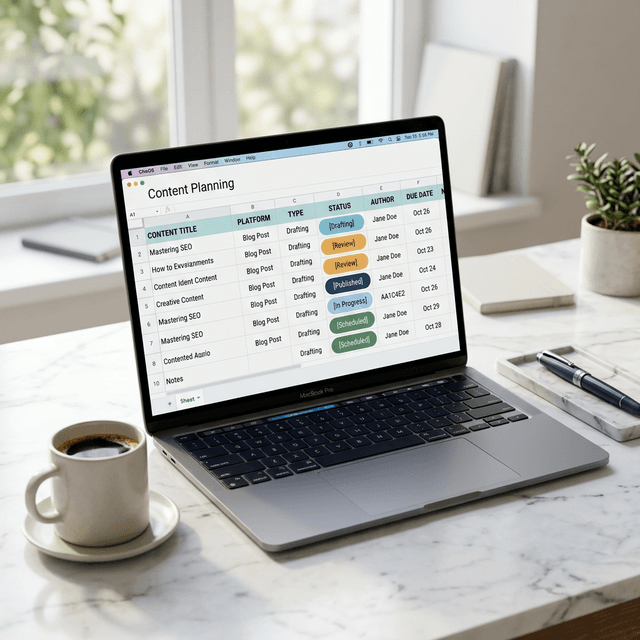
A Google Sheets Content Calendar Template You Can Copy
Use these columns as your starting structure:
| Column | What It Tracks |
|---|---|
| Publish Date | When the piece should go live |
| Title | Working headline for the article or landing page |
| Primary Keyword | Main target query |
| Search Intent | Informational, commercial, transactional, or navigational |
| Content Type | Blog post, landing page, case study, tool page, refresh, or comparison |
| Owner | Who is responsible for moving it forward |
| Status | Idea, brief, drafting, review, approved, published, refresh needed |
| Internal Links | Existing pages that should link in or out |
| CTA | The main conversion action for the page |
| Review Date | When to reassess performance or refresh |
If you want a quick copy-and-paste starter, use this:
Publish Date | Title | Primary Keyword | Search Intent | Content Type | Owner | Status | Internal Links | CTA | Review Date
2026-03-20 | Example article title | example keyword | informational | blog post | Erick | drafting | /blog/example-one, /blog/example-two | /signup | 2026-05-01
How to Make the Template Actually Work
A content calendar only works if the status fields mean something operationally.
For example:
Ideameans not validatedBriefmeans approved to writeDraftingmeans in productionReviewmeans waiting on edits or approvalPublishedmeans live and ready for performance trackingRefresh Neededmeans performance or freshness has slipped
That small layer of discipline is what turns a spreadsheet into a workflow.
If your team also relies on SEO topics, content briefs, and refresh strategy, a sheet like this becomes much more useful.
Common Mistakes With Content Calendars
One mistake is overbuilding the sheet. If it takes too long to update, nobody will maintain it.
Another mistake is tracking every idea equally. A content calendar should separate validated opportunities from random ideas.
A third mistake is ignoring review dates. SEO content is not done the day it is published.
A Simple Workflow
Simple workflow
Google Sheets is enough for many teams until content velocity, stakeholder complexity, or automation needs start to break the process. At that point, the sheet is not wrong. It has just reached its limit.
Ready to Automate Your SEO?
Enter your domain to get a free AI visibility analysis and see how AgenticSEO can help.
Start your free AgenticSEO analysis workflow
Frequently Asked Questions
What should a content calendar include?
A strong content calendar should include publish date, title, keyword, search intent, owner, status, internal links, and a review date so the work stays actionable.
Is Google Sheets good enough for a content calendar?
Yes for many small teams. It works especially well when the workflow is still simple and visibility matters more than advanced automation.
Key Takeaways
- A useful content calendar tracks decisions, not just dates.
- Google Sheets works well when the process is visible, lightweight, and maintained consistently.
- Add SEO fields like keyword, intent, links, and review date so the calendar supports publishing quality.
- Keep the sheet simple enough that your team will actually update it.